
Why Cheap Laser Pointers Burn Out So Fast: What Poor Thermal Design Does to the Diode
Bought a cheap laser pointer that died after a few uses? It's not your fault—it's poor thermal management. This article uses real user stories, teardown videos, and physics to explain how lasers get “cooked” and gives you 4 practical tips to choose a durable one.
Image Gallery
Why Cheap Laser Pointers Burn Out So Fast: The Real Role of Heat Sink Design
“I’m tired of buying the cheap ones that break after ten minutes.”
If that sounds familiar, you’re not alone—and it’s probably not your fault.
Most people assume a laser pointer fails because of “bad batteries” or “overuse.”
In reality, the #1 cause is far more fundamental: poor thermal design.
1. Real User Experiences: The Pattern Is Always the Same
Across Reddit, forums, and hobby communities, the failure pattern is remarkably consistent:
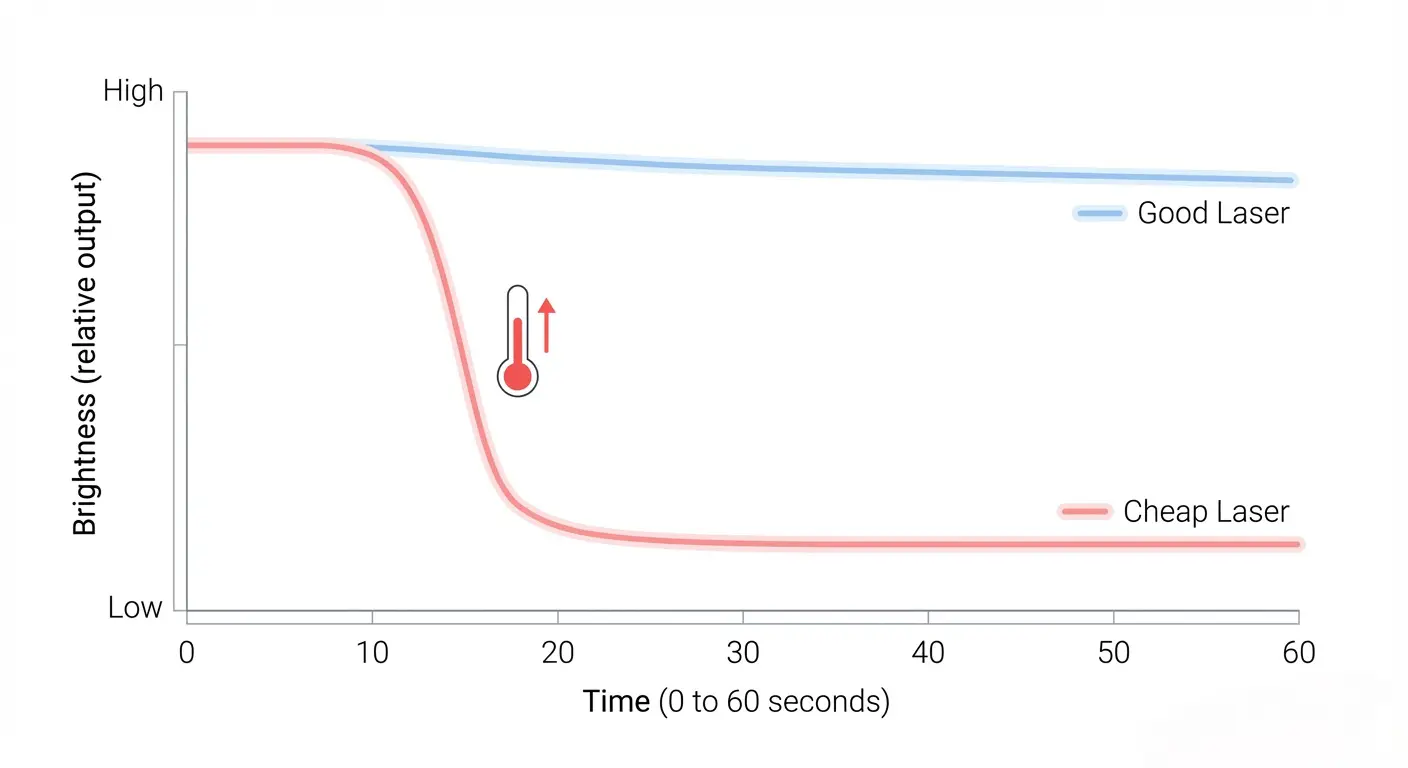
"It broke within 10 minutes… the replacement is bright for 0.5 seconds, then fades to a weak dot."
Source: https://laserpointerforums.com/threads/got-a-532nm-5mw-green-laserpen-and-i-think-it-is-not-working-correctly.87082/
"It dims within a minute… turn it off, it’s bright again, then dims."
Source: https://bbs.homeshopmachinist.net/forum/general/2036218-ot-why-does-my-laser-pointer-dim
"After 10 seconds or so, it suddenly dims to a tiny green spot."
Source: https://www.candlepowerforums.com/threads/problem-with-green-laser-dimming-help.252230/
These are not random defects.
They all point to one mechanism:
👉 Heat builds up faster than it can escape.
2. The Hidden Reality: Most of the Power Becomes Heat
Laser diodes are not very efficient.
According to :contentReference[oaicite:0]{index=0},
typical laser diodes convert only 10%–60% of electrical power into light.
That means:
- 40%–90% becomes heat
- Generated inside a chip smaller than a grain of rice
📎 Source: https://www.rpmclasers.com/blog/general-thermal-management-advice-for-laser-diodes/
In engineering terms, this creates a high heat flux in a tiny junction area.
If that heat cannot move into a heatsink quickly, temperature rises rapidly.
And temperature is everything.
3. Why Heat Destroys Laser Diodes So Quickly
Semiconductor reliability is strongly temperature-dependent.
A widely used engineering rule (Arrhenius-based models):
Higher temperature → exponentially faster degradation
📎 Source:
https://jetcool.com/post/semiconductor-lifetime-how-temperature-affects-mean-time-to-failure-device-reliability/
https://www.electronics-cooling.com/2017/08/10c-increase-temperature-really-reduce-life-electronics-half/
Instead of saying “10°C halves lifespan” as a fixed rule, a more accurate takeaway is:
👉 Even modest temperature increases can drastically shorten lifetime
Now combine that with real device limits:
- Many DPSS green modules are designed for ~20–30°C operation
- Some high-power diodes reach critical limits around ~60°C (case temperature)
📎 Source:
https://www.farnell.com/datasheets/43554.pdf
https://www.thorlabs.com/532-nm-diode-pumped-solid-state-dpss-lasers
💡 What this means in practice:
If your laser body feels “just warm,”
the internal junction can already be far hotter.
4. Teardown Evidence: Cheap Lasers Often Have No Real Heat Sink
Here’s where things get obvious.
Example 1 – Cheap module teardown
- Roughly cut copper PCB fragment
- No fins, no thermal paste
- Wedged into plastic housing
📎 Video: https://www.youtube.com/watch?v=D1MqxxRQ_Kk
"I can feel it warm… and that’s one milliwatt."
Example 2 – $0.70 red pointer
- Entire aluminum shell acts as the only “heat sink”
- Diode simply pressed into housing
- No thermal interface material
📎 Video: https://www.youtube.com/watch?v=jGVjEoZUOsc
What’s missing?
A proper thermal system should include:
- Direct metal contact (preferably copper)
- Thermal interface material (TIM)
- Mass or fins for heat spreading
Cheap pointers typically have none of these.
5. Material Matters More Than You Think
Thermal conductivity varies dramatically:
| Material | Thermal Conductivity |
|---|---|
| Copper | ~400 W/m·K |
| Aluminum | ~205 W/m·K |
| Air | ~0.026 W/m·K |
📎 Sources:
https://walmatethermal.com/copper-vs-aluminum-heatsink/
https://www.tulingmetal.com/copper-vs-aluminum-heatsink/
👉 Copper conducts heat about 2× faster than aluminum
👉 Compared to air, it's thousands of times more effective
💡 Practical insight:
- Good design: copper contact + aluminum body
- Cheap design: thin aluminum shell (or worse, air gaps)
6. Why Green Lasers Fail Even Faster
If your pointer is green (532nm), it’s usually DPSS (Diode-Pumped Solid-State).
This adds two temperature-sensitive components:
- Infrared pump diode (808nm)
- Frequency-doubling crystal (KTP or similar)
Both depend on precise alignment.
Even small thermal expansion can reduce output dramatically.
This explains a very common behavior:
- Bright when cold
- Quickly dims
- Recovers after cooling (temporarily)
👉 Not a battery issue—thermal misalignment
7. How to Tell If a Laser Will Burn Out Quickly
Here are practical checks you can actually use:
1. Short runtime heat test
- Run for ~30 seconds
- If it heats up quickly → poor thermal path
2. Look for real thermal design
- Is there mention of a heat sink?
- Copper contact?
- Driver protection?
If not → assume minimal engineering
3. Ignore exaggerated power claims
- “5000mW” pen-style lasers are almost always unrealistic
- Real high-power devices require significant cooling
8. Cheap vs Quality: What Actually Makes the Difference
It’s not just price—it’s engineering choices.
| Feature | Cheap Laser | Better Laser |
|---|---|---|
| Heat sink | None or minimal | Dedicated metal block |
| Materials | Thin aluminum | Copper + aluminum |
| Thermal interface | None | Thermal paste / tight contact |
| Driver | Resistor only | Regulated driver / protection |
👉 The difference is not branding.
👉 It’s how heat is handled.
9. Already Burned Out? Can You Fix It?
-
Green DPSS lasers → usually not repairable
(crystal alignment requires precision equipment) -
Red/blue diode lasers → sometimes repairable
(if driver failure only)
But in most cheap pointers:
👉 Replacement is more practical than repair
10. What to Do Next (Smart Buying Strategy)
If you're buying your next laser:
- Prioritize thermal design over raw power
- Look for:
- Real specs (not marketing claims)
- Visible build quality
- Warranty or testing data
👉 A stable 50mW laser is more useful than a “500mW” that fades in seconds
Related Reading
FAQ
Why does my laser pointer dim after a few seconds?
Because heat builds up faster than it can dissipate.
In green lasers, temperature changes can also disrupt crystal alignment, reducing output.
Are cheap laser pointers always bad?
Not always—but they usually cut corners on thermal design, which limits lifespan and stability.
Why does cooling the laser make it brighter again?
Cooling temporarily restores optimal operating conditions, especially in DPSS systems.
However, repeated heating cycles can cause permanent damage.
Is higher power always worse for lifespan?
Only if thermal management is insufficient.
A well-cooled high-power laser can outlast a poorly cooled low-power one.
Should I prioritize power or build quality?
Build quality (especially thermal design) is more important for real-world performance.